Home broadband
Our broadband
Switching to Hyperoptic
Social tariff
Hyperoptic Total Wi-Fi®
Refer & earn
For students
Moving home
For gamers
Business
Business broadband
Customer stories
Leased line
Partners
Existing buildings
New build homes
Commercial property
Social housing
Build-to-rent developments
Serviced apartments
About us
Why us
Careers
About us
News & Press
Support
Help centre
My internet is not working
Run a speed test
Contact us
My Account
Home broadband
Our broadband
Switching to Hyperoptic
Social tariff
Hyperoptic Total Wi-Fi®
Refer & earn
For students
Moving home
For gamers
Business
Business broadband
Customer stories
Leased line
Partners
Existing buildings
New build homes
Commercial property
Social housing
Build-to-rent developments
Serviced apartments
About us
Why us
Careers
About us
News & Press
Support
Help centre
My internet is not working
Run a speed test
Contact us
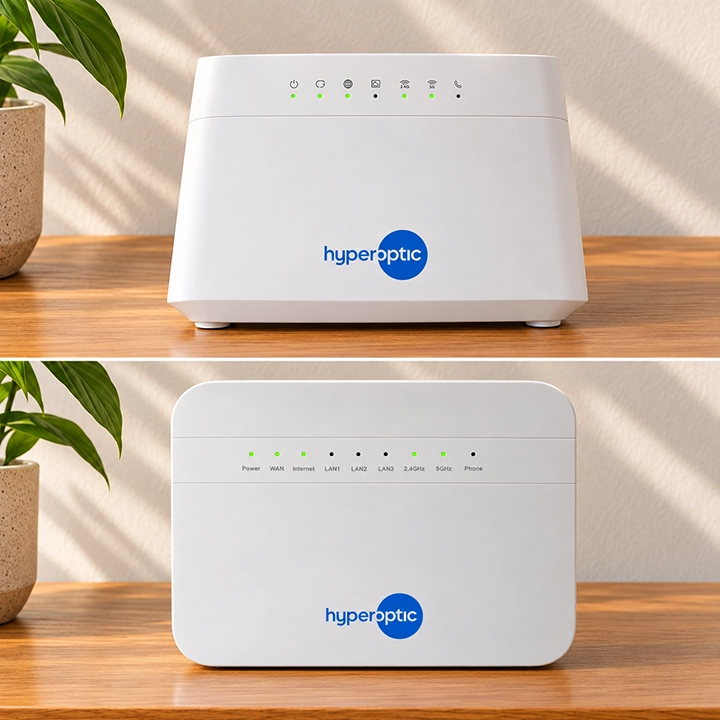
Take a look at your router lights
The lights on your Hyperhub router can show what’s happening with your connection. For a detailed look at what the lights on your router mean, check out our router guides below (this will open a new tab).
Find my router model
My router lights look normal