{{item.title}}

My account
Upload vs download speeds: what’s the difference? |

Upload vs download speeds: what’s the difference? |

Ever waited hours for a file to upload as you send it over a file sharing system? Or had to switch your camera off on a video call because your connection had some serious lag? We’ve all been there!
With the amount of time we all spend online, uploading is now as important as downloading. So why do fast upload speeds matter?
What’s the difference between upload and download speed?
The main difference between upload and download speed is the direction which data is travelling. Upload speeds are the speed at which data is travelling from your device (e.g. laptop or phone) to the internet. For example, when you’re uploading videos or attaching files to emails. Download speed is the speed at which data is travelling from the internet to your device. For example, when you’re downloading a podcast or streaming TV.

What is upload speed used for?
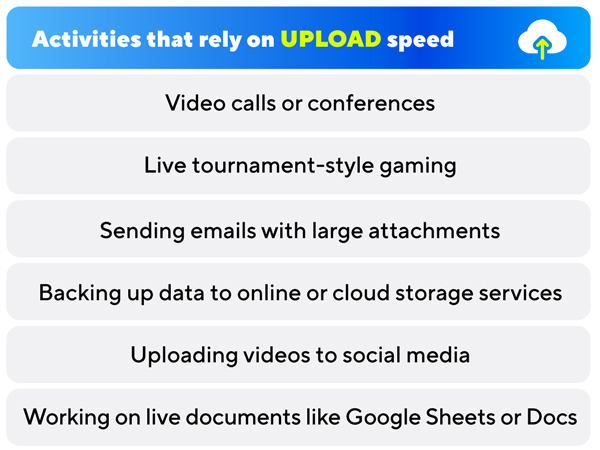
Your upload speed is how quickly data travels between your computer and your network. Uploading is used for anything from streaming video calls and conferences to file or photo sharing on the cloud. So if you’re a gamer, streamer or homeworker, a fast upload speed matters to you. The faster your upload speed, the clearer your calls and the sooner you’re getting things done!
Download and upload speeds in gaming
Download speeds are obviously important when gaming, especially when you’re trying to get the latest patch update on Call of Duty! But if you’re streaming on Twitch, gaming in real time, or trying to upload your latest video to YouTube, a fast upload speed will make things quicker and smoother. We’re here for no more glitchy streams!

Why upload speed matters when working from home?
With flexible office days and remote working seemingly here to stay, you’ve got to think about those upload speeds. Upload speeds matter if you’re making VoIP phone calls, video calls on software like Zoom or Microsoft Teams or working with cloud-based services such as Dropbox or WeTransfer.
How do I know what download and upload speeds I have?
Want to know what speeds you’re getting? You can always check your download and upload speeds by doing a speed test in seconds!
How can I improve my download and upload speeds?
Disappointed by your speed test result? To increase your speed, we always recommend using an ethernet cable to wire up directly to your router. This is because there is no interference on a wired connection, it’s live and direct right to your device.
Depending on your location, you can upload just as fast as you download on our 150Mb, 500Mb & 1Gb packages. Get ready for streaming, chatting, and sharing with Hyperoptic.
Switch to Hyperoptic full fibre broadband today
For more speed-related pieces, explore our Premium Plan page, read our article on broadband speed explained, or simply peruse our extensive collection of other blogs discussing technology, including the difference between modems and routers.
Check out our full fibre broadband packages |

Check out our full fibre broadband packages |